Facecard Roblox Lookbook: Save Looks, Freeplay, Photo Studio
Facecard Roblox Lookbook guide: how to save, load and update looks, what Freeplay and the Photo Studio do, and how to enter Facecard of the Week today.
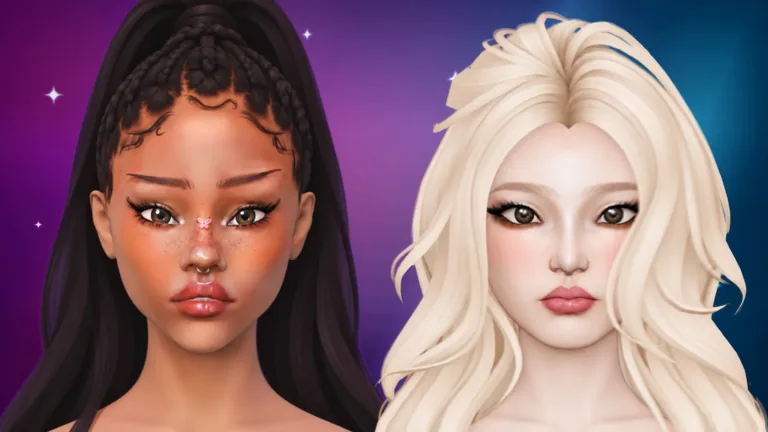
Facecard Roblox Lookbook Basics
The player-run Help Center describes the Lookbook as your collection of saved looks: makeup, hair, lashes, face shape and pose. Its operator and developer affiliation have not been confirmed, and we have not independently tested the saving and loading rules below. It says to open LOOKBOOK in the lobby or on the paint screen, then tap a card to preview the look on a 3D face.
The Lookbook has a limited number of slots, so tidy up now and then. This Facecard Roblox Lookbook guide also covers Freeplay and the Photo Studio.
Facecard Roblox Lookbook: Save, Load, Update and Delete
| Action | How it works |
|---|---|
| Save | While painting, open the Lookbook, tap SAVE NEW LOOK, name it and save |
| Update | UPDATE saves what is on your face over the selected look (second tap to confirm) |
| Load | Select a card and press LOAD. The look opens in Freeplay |
| Rename or delete | The pencil renames and the bin deletes. Deleting needs a second tap and cannot be undone |
Rounds always start fresh, so saved looks are for Freeplay, not for the contest. A saved look keeps its layers, their names and their order, but other players only ever see the finished look.
Facecard Roblox Lookbook Head Icons and OLDER FACE
Each card shows a little head that tells you which head base the look was made on: Classic, Aniya or Mina. The preview always shows a look on its own head base. A card that says OLDER FACE was saved on an earlier version of the game's face and cannot be loaded any more. It is never deleted automatically, so you can keep it or delete it yourself.
Facecard Roblox Lookbook: Facecard of the Week
One look gets crowned and stands on the podium in the lobby for everyone to see.
| Step | What to do |
|---|---|
| 1 | Select a saved look |
| 2 | Press the gold SUBMIT button and confirm |
| Limit | You have one entry. Submitting again swaps it for the new one |
Your entry is a copy of the look as it is right now, so later changes do not affect it.
Facecard Roblox Lookbook: Freeplay and Photo Studio
Freeplay is painting with no theme, no timer and no votes. The FREEPLAY button sits at the top right, next to the settings gear. Freeplay runs in its own server, so the game asks before you leave the round server, and EXIT brings you back to the rounds.
| Freeplay feature | Detail |
|---|---|
| Small X button | Puts the paint screen away so you can visit the shop, codes, Lookbook and ranks. Press FREEPLAY again to get your look back |
| After a disconnect | Freeplay saves in the background. Next time you join, choose RESTORE or DISCARD |
| EXIT | Counts as finished and nothing is kept, so save looks you love to the Lookbook |
| Photo Studio | Camera button next to the gear. LIGHT, backdrop colours, POSE, HIDE UI and SNAP, which offers to save to your Roblox captures |
Facecard Roblox Lookbook FAQ
How do I save a look in the Facecard Roblox Lookbook?
Open the Lookbook while painting, tap SAVE NEW LOOK, name it and save.
Can I use a saved Facecard Roblox look in a round?
No. Rounds always start fresh. Load the look in Freeplay instead.
What does OLDER FACE mean in the Facecard Roblox Lookbook?
The look was saved on an earlier version of the face and can no longer be loaded. It is not deleted automatically.
Does Facecard Roblox Freeplay have a timer?
No. Freeplay has no theme, no timer and no votes.
Source: Lookbook and Freeplay, a player-run Help Center whose operator and developer affiliation have not been confirmed. This is a fan-made wiki and is not affiliated with Roblox or the developers.
Related Guides
Facecard Roblox Guide: How Rounds, DONE and Voting Work
Facecard Roblox guide for new players: how each round works, what the DONE button does, how looks are ranked and what to do when you join a round late.
Facecard Roblox Head Bases: Classic, Aniya, Mina and Style
Facecard Roblox head bases explained: the three free faces, the STYLE tab, eyes, hair, lashes, piercings, rhinestones, poses and setting sprays at once.
Facecard Roblox Makeup Tutorial: Brushes, Layers and Colours
Facecard Roblox makeup tutorial: how Size, Strength and Softness work, what Mirror and layers do, and how stamps, colours, skin tone and the camera behave.
Facecard Roblox Sculpt: Unlock Tasks, Sliders and Presets
Facecard Roblox Sculpt: see the join-group and like-game tasks shown in a player video, plus reported sliders, resets and saved presets and their limits.