Facecard Roblox Makeup Tutorial: Brushes, Layers and Colours
Facecard Roblox makeup tutorial: how Size, Strength and Softness work, what Mirror and layers do, and how stamps, colours, skin tone and the camera behave.
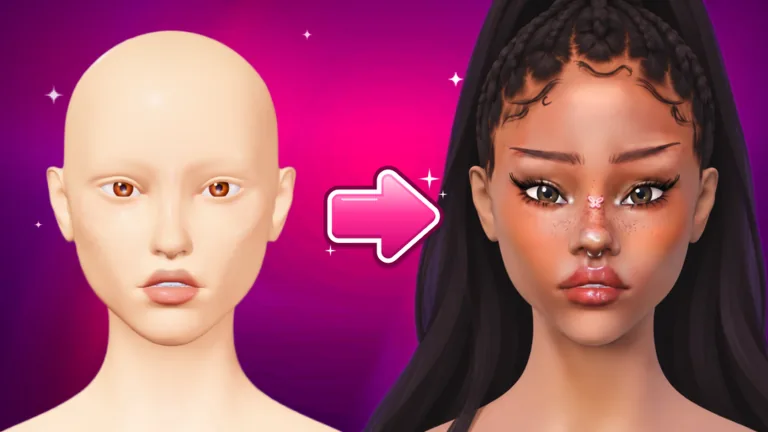
Facecard Roblox Makeup Tutorial: Painting Basics
To paint in Facecard: Makeup Showdown, pick a product on the left under MAKEUP (foundation, blush, liner, lipstick and more), pick a colour on the right, then draw on the face. This Facecard Roblox makeup tutorial summarizes controls reported by a player-run Help Center; its operator and developer affiliation have not been confirmed, and we have not independently tested these controls. New to the game? Start with the Facecard Roblox guide. Hair, eyes and lashes are covered in the Facecard Roblox head bases guide, and the face itself is reshaped in the Facecard Roblox Sculpt guide.
| Device | Paint | Turn the head | Zoom |
|---|---|---|---|
| PC | Left drag | Right drag | Mouse wheel |
| Phone or tablet | One finger on the face | Drag on the background | Pinch |
Facecard Roblox Makeup Tutorial: Brush Settings
Every product remembers its own settings. Zooming in makes every brush finer, which is useful for detail.
| Setting | What it does |
|---|---|
| Size | How big the brush is |
| Strength | How much colour goes down in one stroke |
| Softness | The edge: high for a blended, airbrushed look, low for crisp lines |
| Mirror | Paints both sides of the face at once. It starts switched on, and you turn it off on the bottom bar for one-sided looks |
| Stabilizer | Smooths shaky lines, good for liner and lips. The brush ring turns pink while it is on |
Facecard Roblox Makeup Tutorial: Layers, Undo and Clear
Open Layers on the right panel. You always paint on the selected layer. If your brush seems dead, check whether that layer is hidden, because a hidden layer takes no paint.
| Action | How it works |
|---|---|
| Move or rename a layer | Use the arrows and the pencil |
| Hide or show | The eye icon |
| MERGE ALL | Squashes the visible layers into one. Undo brings them back |
| Undo and Redo | On PC, Ctrl+Z and Ctrl+Y. Undo steps back through strokes, stamps, lash clusters, rhinestones, piercings and layer changes |
| CLEAR | Empties the selected layer after a confirmation, and you can still undo it |
A pass in the shop gives you extra layers (see Facecard Roblox ranks and shop).
Facecard Roblox Makeup Tutorial: Stamps, Colours, Skin Tone
Brow Stamps print a whole brow in one press. Shape Stamps print hearts, stars, sparkles and ready-made eyeliner wings. After you place a stamp it is normal paint, so you can blend it, wipe it or paint over it. The Blender button smudges and softens paint, and Wipe rubs it off.
| Tool | What it does |
|---|---|
| Palettes | Ready-made colours. Neon glows and Chrome shines like metal, and those two palettes are VIP |
| Custom | Mix any colour and save favourites |
| Pipette | Picks the exact shade from skin or makeup, not from hair, lashes or eyes |
| Skin | Pick a tone on the right panel, or use the rainbow block for any shade |
| Shine | Lip Gloss adds a wet shine and Highlighter a soft shimmer. Glitter and Freckles brushes sprinkle dots |
Facecard Roblox Makeup Tutorial: Camera Controls
The FACE, EYES and LIPS buttons jump to a ready-made view. The small square button by the bottom bar opens the camera pad: arrows slide the view, plus and minus zoom, and the curved arrows turn the head. The padlock is Camera Lock, which stops stray touches from moving your view. That covers the controls in this Facecard Roblox makeup tutorial.
Facecard Roblox Makeup Tutorial FAQ
Why will my brush not paint in Facecard Roblox?
Check three things: the selected layer may be hidden, the pipette may be switched on, or you may hold a VIP tool without VIP. If it still fails, leave and rejoin.
Why does Facecard Roblox lag while I paint?
The Help Center says very big brushes with Mirror on are the heaviest thing you can do. Use a smaller brush, merge layers you are finished with, or lower the graphics quality in the Roblox menu.
How do I match a foundation to the skin tone in Facecard Roblox?
Tap the pipette in the Custom tab, then tap the face to get the exact shade at that spot.
Source for this Facecard Roblox makeup tutorial: Painting Tools and Settings and Troubleshooting, a player-run Help Center whose operator and developer affiliation have not been confirmed. This is a fan-made wiki and is not affiliated with Roblox or the developers.
Related Guides
Facecard Roblox Guide: How Rounds, DONE and Voting Work
Facecard Roblox guide for new players: how each round works, what the DONE button does, how looks are ranked and what to do when you join a round late.
Facecard Roblox Head Bases: Classic, Aniya, Mina and Style
Facecard Roblox head bases explained: the three free faces, the STYLE tab, eyes, hair, lashes, piercings, rhinestones, poses and setting sprays at once.
Facecard Roblox Lookbook: Save Looks, Freeplay, Photo Studio
Facecard Roblox Lookbook guide: how to save, load and update looks, what Freeplay and the Photo Studio do, and how to enter Facecard of the Week today.
Facecard Roblox Sculpt: Unlock Tasks, Sliders and Presets
Facecard Roblox Sculpt: see the join-group and like-game tasks shown in a player video, plus reported sliders, resets and saved presets and their limits.